Blog / Engineering
How we built the system that runs every LLM Leads profile
LLM Leads runs LinkedIn outreach for sales teams. You tell us who you want to reach, and we run the profiles that find those people, engage with them, connect with them and start conversations. The accepted connections and replies come to you.
This post explains the system that does that work: what decides each profile's next move, where the work happens, how a profile stops when LinkedIn pushes back, and how every message is checked before it goes out. We run our own sales on the same system, so every figure here comes from our own profiles.
The short version
- You tell us who to reach. Our profiles find those people, engage with them and connect, and the accepted connections and replies come to you.
- Every profile runs on its own Windows machine in our office, directed by one server that decides what each profile does next.
- Every message passes code checks before it goes out, replies also pass a reviewing model, and an offer that promises anything beyond our free preview waits for a person.
- When LinkedIn pushes back, the profile backs off. A paused profile stops inviting, and a security check stops everything until someone on our team has looked at it.
- A monitor checks every profile every 10 minutes, and every evening the system measures what worked and writes lessons that the planner reads on its next run.
The system in six numbers
Each of these was read from the code and the production database on 22 September 2026.
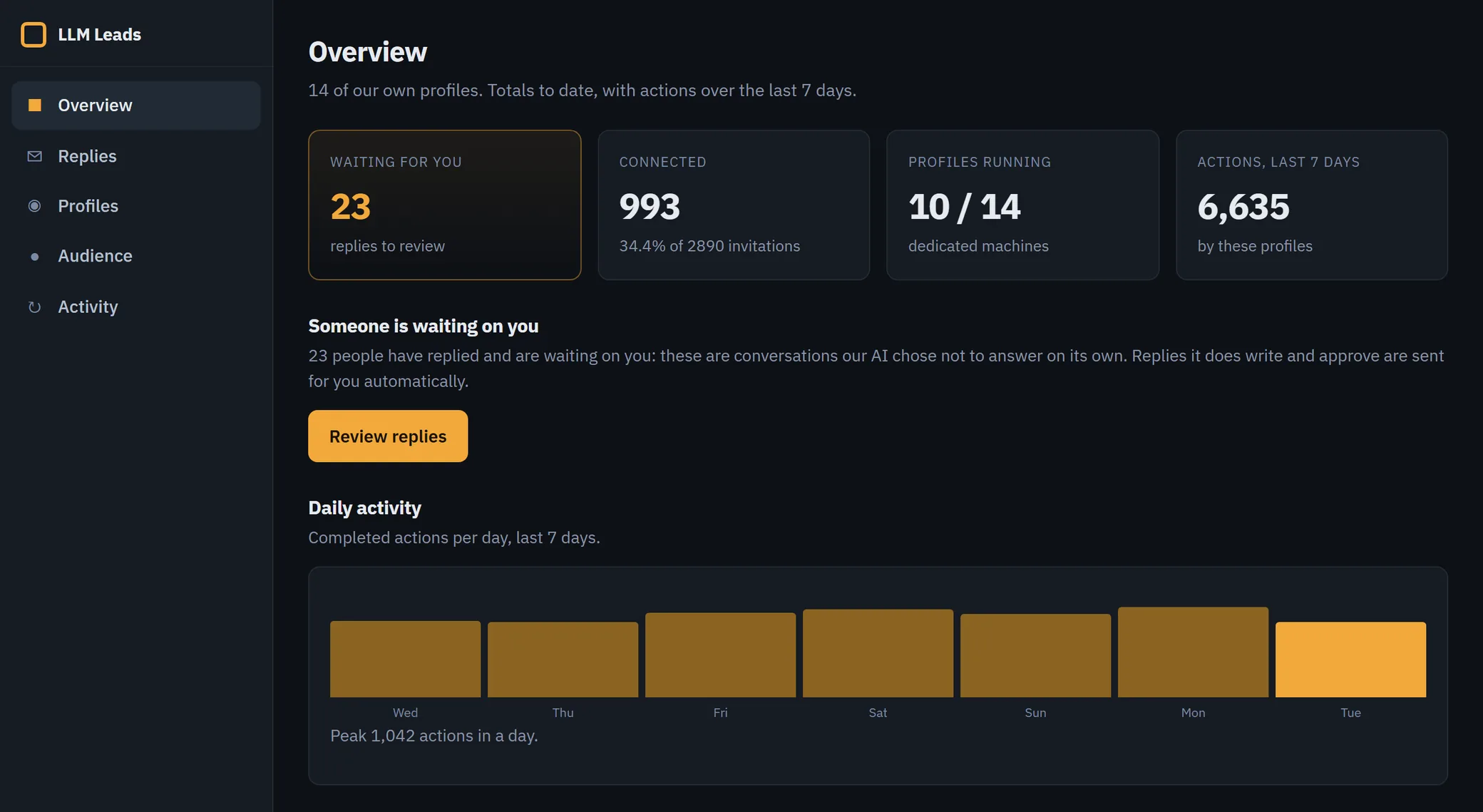
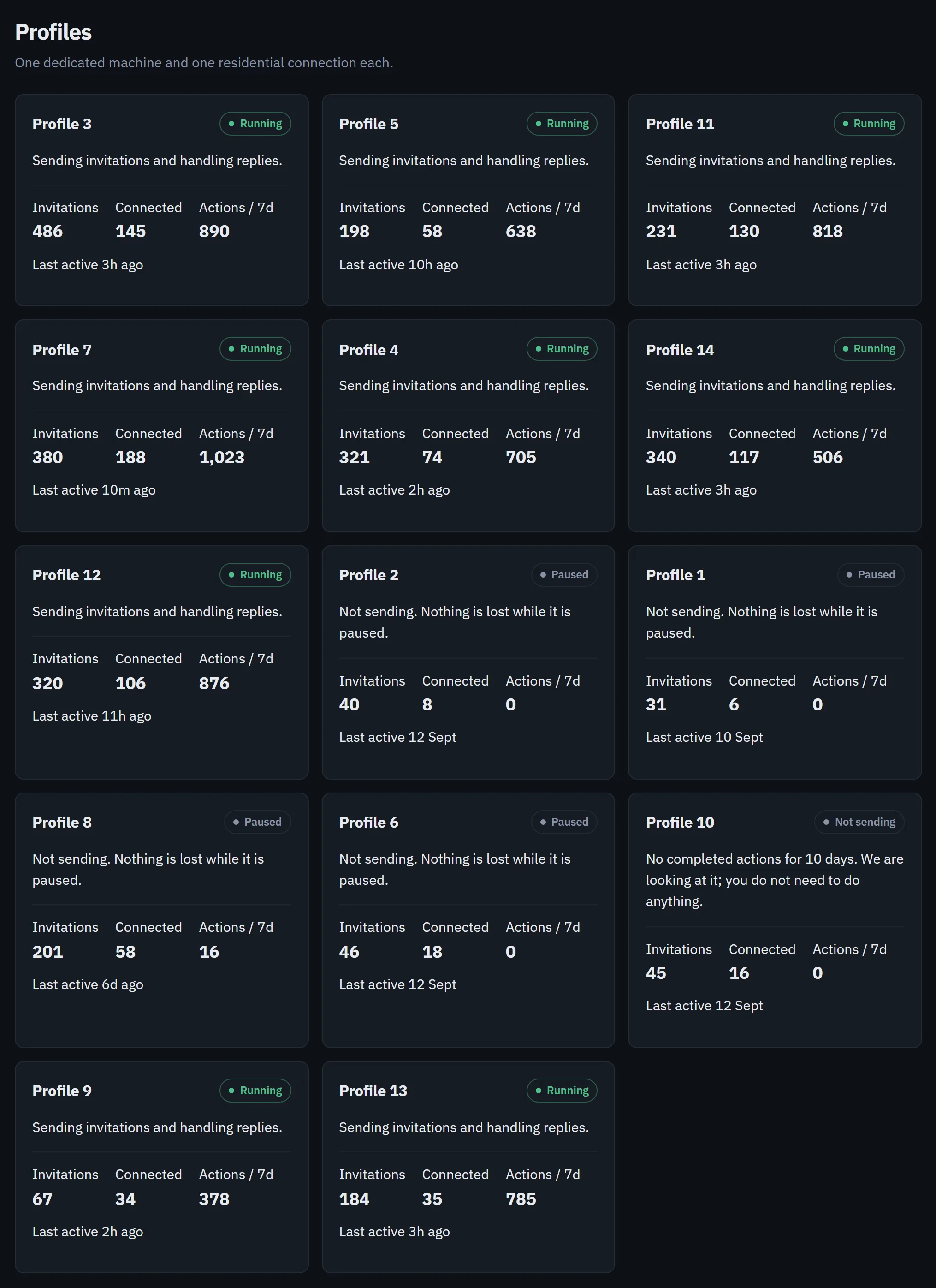
The sample dashboard shows only the 14 profiles assigned to our own account in the customer app, so its totals are smaller than the whole fleet's. Live results for every profile we run, including prospects found, invitations sent and how many were accepted, are on the homepage, re-measured every week.
What a profile does in a day
Each profile finds people who fit your ideal customer, reads their profiles, engages with what they post and sends connection invitations. When someone accepts, it follows up with a message, and when they reply, it answers or passes the conversation to a person.
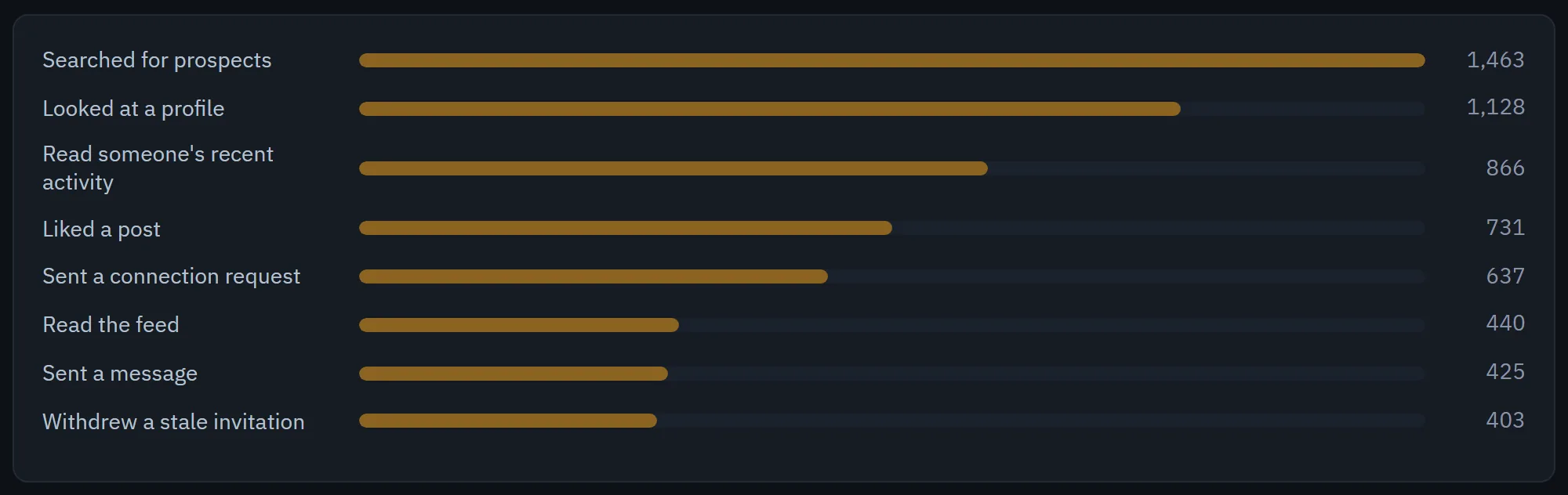
Most of a profile's day is reading and engagement. Invitations and messages are a small share of what it does, and the pace is set separately for each profile by the planner described below.
01The map
The whole system on one page
Things happen in three places. One Ubuntu server holds all of the judgment and all of the memory. A Windows PC for each profile holds that profile's browser session and does the clicking. LinkedIn is the third. The database on the server is the only shared state: a machine never holds a database password, and the server never holds a LinkedIn session.
- 1The planner reads each profile's state from MySQL (health, budget, prospects, conversations, lessons) and writes timed actions into the queue.
- 2It asks a Qwen model on our own GPUs for the day's strategy and for the next batch of actions, and gets JSON back.
- 3Every 10 or 15 minutes, each machine's executor pulls the actions that are due for its profile, performs them and reports each result. This is the only way work reaches a machine.
- 4The executor drives the profile's own signed-in Chrome on LinkedIn: it opens profiles, sends invitations, likes and comments on posts, sends messages and publishes.
- 5Separately, every machine pushes what it sees: heartbeats, health verdicts, inbox and thread contents, new prospects found by its scraper, and screenshots.
- 6When an action needs words, such as a comment, a message or a post, the executor asks the server and the server asks the model. The machine never talks to a model directly.
- 7The monitor reads everything every 10 minutes and tells a person on Telegram what is wrong.
- 8For a short list of problems it knows how to fix, it repairs the machine itself over our private network, for example by restarting a browser that stopped responding.
- 9Every evening the outcomes job measures what was accepted and answered, and writes lessons that the planner reads on its next run.
- 10Every piece of text passes code checks before a machine can use it. Replies also go to a reviewing model, and posts get their final review from Claude.
- 11People approve any reply that makes an offer, take over drafts the reviewers keep rejecting, and handle what only a person can, such as a sign-in LinkedIn wants confirmed.
02The brain
The server that plans
A single script, run by cron every 30 minutes, plans for every profile in turn. It never opens a browser and never holds a LinkedIn session. Its whole job is to turn the current state of the database into the next batch of timed actions for each profile.
For each profile it first runs a set of gates, and a profile that fails any of them gets nothing planned on that pass:
- Health. If the latest health verdict says the profile is signed out, restricted or blocked, plan nothing. A stale verdict counts as unknown, because a machine that died stops sending verdicts and its last "fine" would otherwise stand forever.
- Roster. Being active is a permission. A profile also has to be named on the execution roster, or everything planned for it is written as a shadow row that never runs.
- Working hours. Each profile has hours it works and hours it does not. Outside them, nothing is planned.
- Machine alive. If the profile's PC has not sent a heartbeat recently, planning for it would only produce work that expires unleased.
- Anything left to spend. If today's budget is already used or already queued, a model call would only produce actions that code then drops, so the call is skipped.
Once a night, a strategist agent for each profile reads that profile's own history with a set of tools and writes the day's plan: what to focus on, what to stop doing and what to watch. The planner puts that plan into its prompt on every pass. A profile that passes the gates then gets a model call proposing its next few actions, as JSON with a target, a delay and a reason for each.
Code then decides which proposals are kept. A coordination step drops any proposal that breaks a budget, goes past the daily invitation ceiling we set across all profiles, targets someone the profile already touched today, or invites someone who was already invited. Every drop is counted and logged, so when the model asks for 12 actions and we keep 5, the log says so. Then two floors add what the day still owes whatever the model said: follow-ups to people who accepted, and checks on invitations whose outcome we have not read yet.
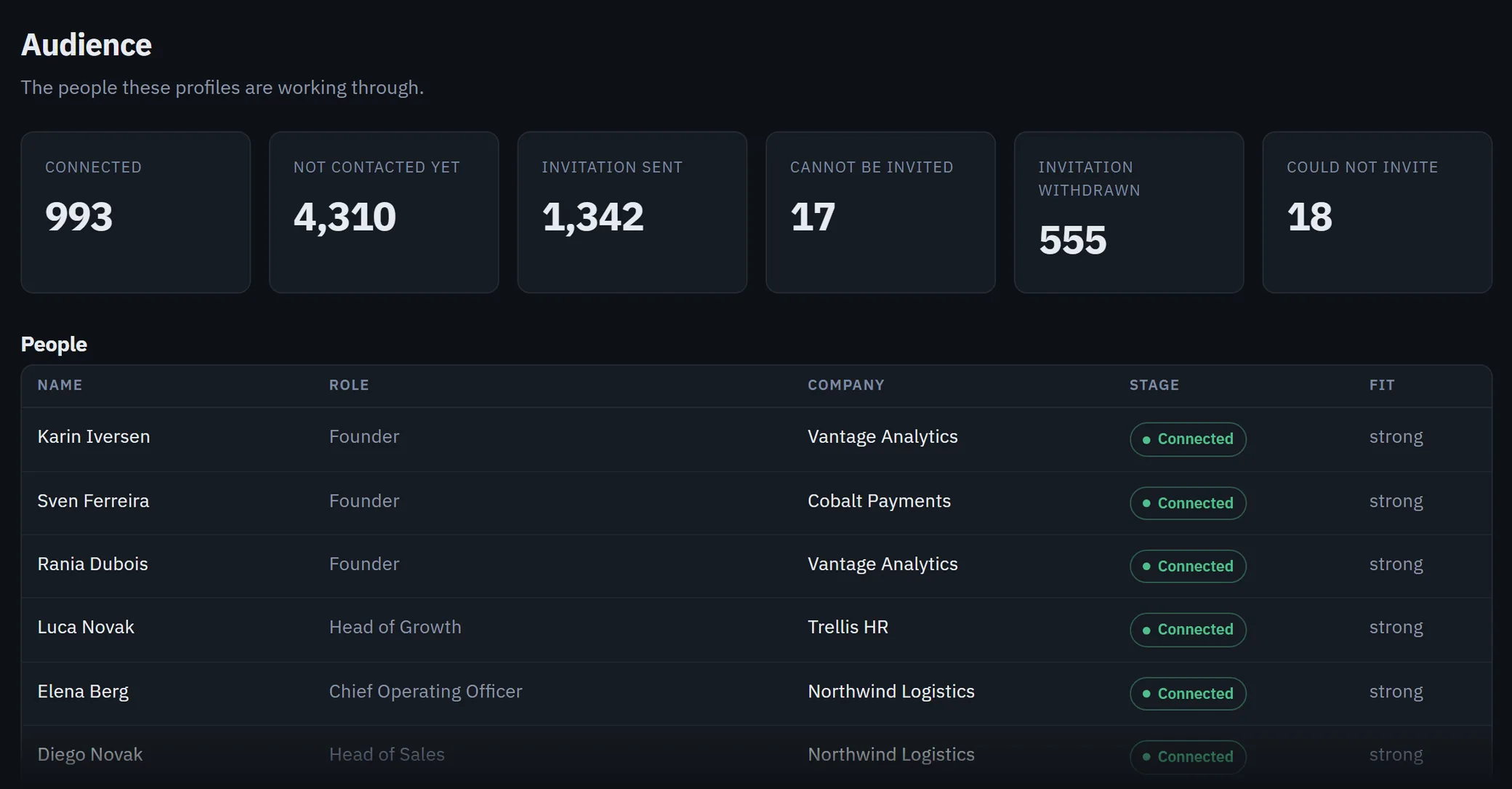
Every prospect carries a stage, and those stages are what the planner and the dedup rules work from. A customer sees them, in plain words and with a couple merged, on the Audience page of their dashboard.
Where the models run
The planning, the writing, the review of replies and the nightly strategists all run on an open-weight Qwen model on our own GPUs. Every call goes through one proxy on the server that records which job made it, how long it took and whether it worked. In the three days to 22 September that came to 4,444 calls from the LinkedIn system. 26 of them went to Claude, all of them the final review of a post before it is published.
We moved the volume work off a hosted model for a measured reason. When the daily strategy calls ran on a subscription, they failed for whole days at a time once its usage limit was reached: on one day, 597 calls and not one success. On our own hardware the failures we see are occasional dropped connections, which a retry recovers.
03The hands
The machines that act
Each profile runs on its own Windows PC in our office. That PC has a normal, visible Chrome signed into the profile's account, and the automation drives that browser with Playwright over the Chrome DevTools protocol on the same machine. The session lives in that browser and the server never holds it, so nothing on the server can act as the account.
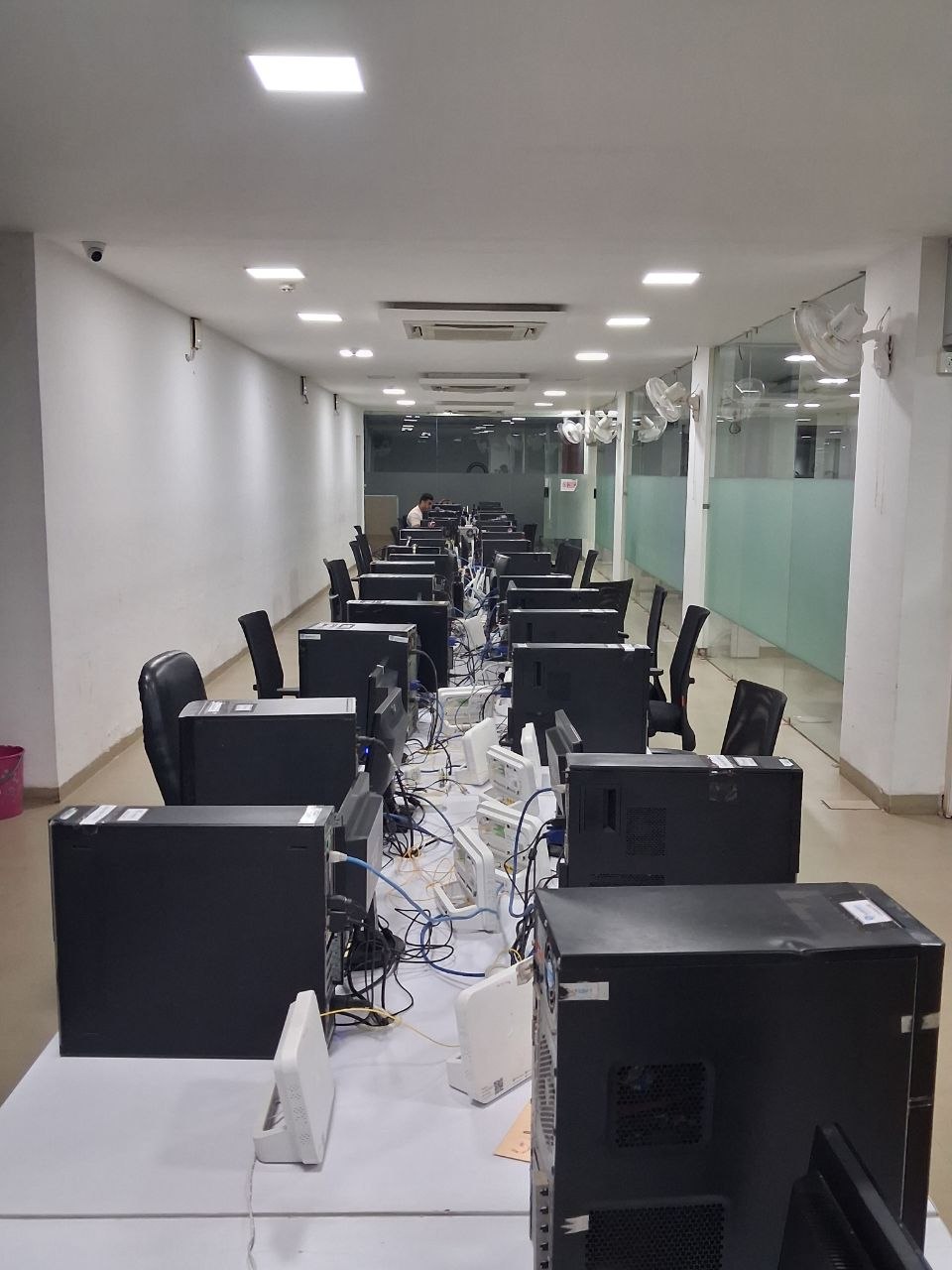
Keeping one profile on one machine also keeps failures small. A crashed browser, a full disk or a signed-out session affects one profile, and the fix can be as blunt as restarting everything on that PC without touching anyone else's.
Windows Task Scheduler runs 17 tasks for each profile. The important ones:
- Executor, every 10 or 15 minutes: pull the due actions, perform them and report.
- Heartbeat: tell the server the machine is alive and publish its state, including paused actions, a halt flag and the version of the code it runs.
- Health check: open the profile's own feed in its own tab and record whether it is signed in and usable.
- Inbox and thread readers: bring new messages to the server, where replies are drafted.
- Scraper: search for people who match the customer profile and send them to the server as prospects.
- Reply sender: send a reply only once it has passed review on the server.
- Screenshot: keep a recent frame of the screen, so a person can see what the machine sees without logging in to it.
Each machine also keeps a small SQLite ledger: who this profile has already touched, how much it has done today, and any pause or stop flag. That ledger is a second, independent check. If a bug on the server ever planned the same invitation twice, the machine would still refuse it.
Code reaches the machines through a deploy tool that copies the package, reads it back and compares hashes after normalising line endings on both sides, because files edited on Windows otherwise show differences that are not real. Every heartbeat carries a hash of the package it is running, so a machine on old code shows up on the monitor.
04The queue
How one action reaches one machine
Every planned action is a row in one table. The planner inserts it as queued with a time. A machine asks for work, and the server leases the due rows to it. The machine reports each one back as done, failed or skipped. That is the entire contract between the two halves of the system, and most of the hard bugs we have had lived inside it.
executing is the fix described below.Three rules keep the lease correct:
- Claim, then prove the claim. The server selects the due rows, marks them
executingwith a fresh random token and a lease time, and then hands the machine only the rows that read back under its token. Two machines pulling at the same instant can never both hold the same row. - A lease has a clock. A machine that dies mid-run never reports. After 30 minutes without a report, the row can be leased again. Nothing is still working on it by then, because every executor force-exits 15 minutes after it pulls.
- Old work dies. An action more than 3 hours past its time is retired as
expiredinstead of being performed late. Expired is a special kind of skipped: it does not use up the prospect, so that person can be planned again later.
A bug we fixed on 21 September. When LinkedIn tells a profile it has sent enough invitations for now, the machine pauses that profile's invitations. Invitations it had already leased before the pause are held on purpose and left unreported, so that they expire instead of being marked as tried. They never expired. Every 30 minutes the next pull leased the held row again and wrote a fresh lease time, while the expiry rule was waiting for a lease 3 hours old. One row sat in executing for 14 hours. It held a slot under the daily invitation ceiling, and the monitor reported a healthy machine as a stalled one every 10 minutes.
The fix has two parts. The server no longer re-leases a row that is more than 3 hours past its time, and the planner retires such a row 30 minutes after its last lease. When a machine publishes an invitation pause, the planner now releases that profile's queued invitations straight away, so the slots under the ceiling come back on the same pass.
The general rule we took from it: if the path that hands out work also refreshes the timestamp that expiry reads, a row the worker keeps refusing will live forever.
05Direction of travel
What the machines report
Every connection in the main loop starts on the machine. Machines pull work, report results and push heartbeats to the server over HTTPS. The server can also reach them over a private network for repairs, but nothing the system produces depends on that.
That choice was tested for real. For several weeks in August and early September, a network access rule left the server unable to reach any machine at all. The profiles kept completing about a thousand actions a day the whole time, because the machines were still pulling. The only thing that broke was the repair path, which is the path you need when a browser wedges, and nobody noticed until a repair was needed and quietly did nothing. The daily output looked normal throughout, so it could not have told us that we had lost the ability to fix anything.
The same idea runs the page our office team uses to see which machines need a person. It is rebuilt every 5 minutes from what the machines have pushed, with the age of each fact shown next to it, and it refuses to replace a good page with one it could not build properly.
A heartbeat carries more than "alive". It says which actions are paused and until when, whether the profile's stop flag is set, which code version is running and how far the machine's clock is off. The planner reads those values directly: a profile with invitations paused gets no invitation budget, and a halted profile gets no budget at all.
The customer's dashboard follows the same rule. Whether a profile is marked as running is one fact, and what its machine actually did is another, so each profile card shows its health from the machine's own activity. A profile marked as running that has completed no actions for more than three days reads "Not sending", with a note that we are looking at it.
06Refusal
Three layers of refusal, and the checks on every message
A large share of the code exists to say no. The checks sit at three layers so that a bug in one layer is caught by the next.
The planner refuses to plan
These are the gates described above. An unhealthy, unrostered, sleeping or unreachable profile gets nothing. Budgets, the daily invitation ceiling and the dedup rules drop anything the model proposes that goes over them.
The server refuses to lease
At pull time the server checks the profile's health history again. A security check from LinkedIn in the recent history halts the profile, and a verdict the server cannot read holds the pull, so nothing is leased. A prospect who asked not to be contacted is filtered out of the lease even if an action for them was queued earlier, and the machine receives the do-not-contact list with every pull so that its own check has data to work with.
The machine refuses to act
The machine checks its own caps and its local ledger before every action. When LinkedIn shows a security check, the machine writes a stop file to its own disk and stands down. The stop holds even if the server cannot be reached, and no code ever lifts it: a person looks at that machine's screen first and then clears it. A plain sign-out is treated differently. It can recover by itself after three healthy checks in a row.
Every message is checked before it goes out
Nothing a profile writes goes straight from the model to LinkedIn. The machine asks the server for the words, and the server checks them before handing them over. Code runs first. If the text mentions our product, it has to say plainly that the writer works on it, and it cannot contain formatted links or an old product name. Comments also have to read differently from the profile's own recent comments and from those of our other profiles, and a comment with stock phrasing, decoration or an overclaim is dropped. If the code checks cannot run for any reason, no text is returned and the action is skipped.
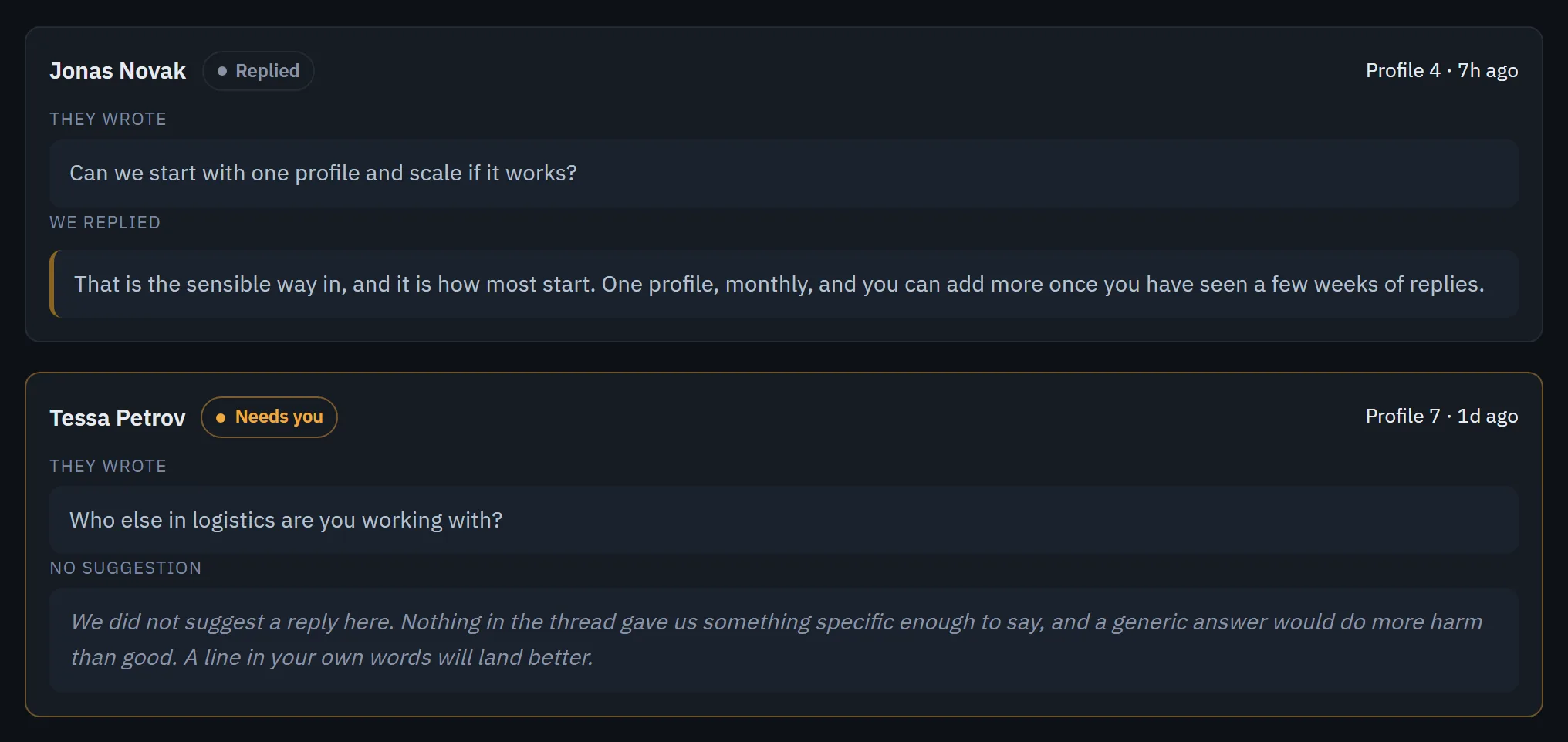
Replies to people who wrote to a profile then go to a second model acting as reviewer. It judges whether the reply answers what the person actually said, and records its verdict and its reasons. It fails closed: an error or an answer it cannot parse leaves the draft unapproved. Since 3 August it has reviewed reply drafts 530 times and rejected 204 of them. A draft that keeps failing is handed to a person instead of being rewritten forever, and a reply that makes an offer is held until a person approves it, because an offer commits our team to real work.
Sometimes the writer declines to draft anything, because nothing in the thread gives it something specific to say. That conversation also waits for a person, and the dashboard lists it under “Needs you”.
Posts go through an editor loop. A model writes the draft, Claude reviews it and asks for changes, and the draft is revised until Claude approves it or a person takes over. Every post published in the two weeks before this article came out of that loop. Once a post is live, a job that runs every 15 minutes sends its link to a person, so someone reads what went out.
07Monitoring
A monitor that knows 111 kinds of trouble
Every 10 minutes one job reads the whole system and lists what is wrong. Each of its 111 problem kinds exists because the thing it detects once went unnoticed. A few examples:
- Executor stalled: actions are due and nothing has completed. It separates "nothing is leased", where the machine is not asking for work, from "a row is leased and never completes", where the browser is stuck, because those send you to different places.
- Health check stale: the machine is alive and Chrome answers, but the profile has not produced a health verdict in hours.
- Beacon stale: every scheduled job stamps a timestamp on every run, including the runs where it found nothing to do. A job that has stopped stamping has stopped running.
- Inbox unanswered: someone wrote to a profile and nobody has replied. This is the outcome the whole system exists to produce, so it is watched closely.
For a closed list of problems the monitor fixes things itself, and every one of those repairs can be repeated without harm: restart a browser that stopped responding, re-point a machine's scheduled tasks, put a stuck reply draft back in the queue, restart a stuck service. A repair that has already been tried several times in a day stops and becomes a message to a person, and so does anything outside the list.
Those messages go to Telegram, and getting their volume right took several rounds. Sending every change produced over a hundred messages a day, and a channel that fires every 15 minutes gets muted, which is how a real prospect's reply once sat unread for weeks. Today a new critical problem is sent at once, at any hour, and everything else waits for a digest, at most once an hour during waking hours. We chose that policy by replaying 1,504 recorded monitor runs through each candidate and counting the messages each would have sent: 14 to 19 a day for the digest, down from 53 to 99.
08Learning
Learning from its own outcomes
Every evening a job measures the results against specific questions: whether acceptance differs by seniority, by the search that found the prospect, by day of the week, and by whether a profile engaged with the person's posts before inviting them. A difference only becomes a lesson if each side has enough cases, the effect is large enough, and it passes a significance test that allows for how many questions were asked. Lessons are written to a table, and the planner reads the active ones into its prompt on its next run. So far the job has written 488 lessons, and 32 are in use today.
The most useful thing this loop taught us was about our own measurement. An early lesson said invitations with a note were accepted 69% of the time, against 3% without one. That was an artifact. The field we were reading was written when an invitation resolved, so a prospect had a "note" because their invitation had already been answered. The size of the effect should have been the warning. Now any experiment is assigned to a prospect in advance, by a fixed rule, and recorded when the invitation is sent.
There is a limit today, and we would rather state it. A lesson reaches the planner as text in its prompt. The model may follow it or not, and code does not yet change a ranking or a budget because of one. Wiring a tested lesson into an actual control is the next piece of this loop.
09What broke
Bugs that changed the design
Most of the rules in this system come from something that went wrong quietly. These are the ones that changed how we build everything else.
Alerts marked as sent that never arrived
Our Telegram sender returned success for messages that a routing rule had quietly refused. For about two weeks the monitor believed it was alerting while none of its messages arrived. Every sender now returns a separate delivered flag, and a problem only counts as announced once a message carrying it has actually been delivered.
A health check that passed on browsers that could not work
Chrome's HTTP endpoint can answer while its automation connection hangs, and a browser can be running with no page open at all. Checks that only asked whether Chrome was up said yes to machines that could not do anything. The health check now opens the profile's own feed in its own tab and judges what it sees.
A list we trusted to be complete
We treated "this person is no longer on LinkedIn's pending invitations page" as "their invitation was answered". That page does not list every pending invitation. More than a hundred prospects sat waiting to be checked again, and the profiles spent their highest-priority reads asking the same question over and over, about one person 24 times. Absence from a list is only evidence when you know the list covers everything you hold.
An alert fix judged by one quiet run
The first fix to the message volume looked finished after one quiet run. The next four runs each sent a message. Every alert change is now judged by replaying days of recorded runs through it, never by watching the next one.
What we would keep if we started again
- Put all the judgment in one place. One planner, one database and one queue, with machines that act and keep a local veto.
- Let the workers pull. The profiles kept working through a total loss of inbound reach because no work depended on the server reaching out.
- Make every job prove it ran. A timestamp on every run is the cheapest monitoring there is.
- Put checks between the writer and the send. Code rules on everything, a reviewing model wherever a reply has to answer someone, and a person on anything that commits us to something.
- Write down why. Most comments in this codebase record an incident and a measurement. They are how the next change avoids repeating the last mistake.
What this means for the profiles we run for you
Your profiles run on this same system, alongside ours.
- You see what we see. The dashboard shows each profile’s invitations, connections and actions, which conversations were answered and which are waiting.
- There is no invitation quota for you to manage. The planner sets each profile’s pace from how that profile is doing.
- When a machine stops working, its card says so and our team fixes it. You do not need to do anything.
- If LinkedIn restricts one of your profiles, we replace it at our cost, so you keep the number of working profiles you signed up for.